ERROR : Parsing error: Cannot find module 'next/babel'
Next.JS 프로젝트 세팅 시 아래 처럼 import에 빨간 줄이 그어진걸 볼 수 있다.

마우스를 올려 보면
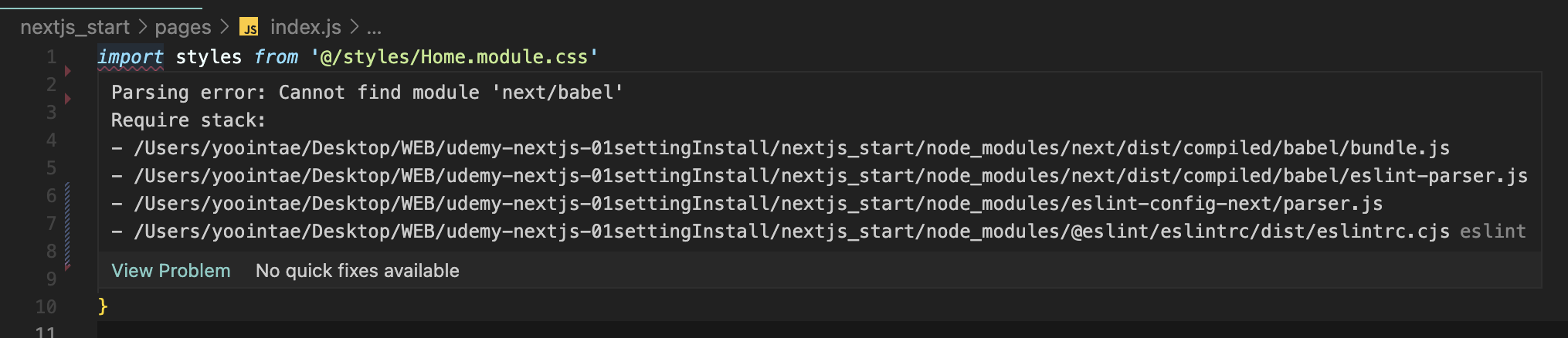
Parsing error: Caonnot find module 'next/babel'... 이렇게 파싱 에러가 나온다.
해결 방법 :
1. 프로젝트 루트 폴더 내에 .babelrc 파일을 만든다.

그 안에 아래 코드를 입력한다.
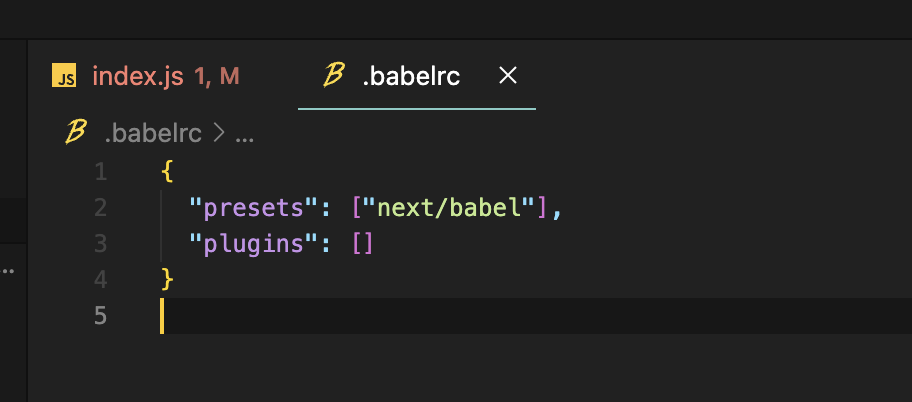
{
  "presets": ["next/babel"],
  "plugins": []
}
2. Next.JS 프로젝트 시작 자동으로 생성된 .eslintrc.json 파일을 열어 코드를 아래와 같이 수정한다.

{
  "extends": ["next/babel","next/core-web-vitals"]
}
inport에 나타난 파싱 에러가 사라진걸 볼수 있다.

'Error' 카테고리의 다른 글
| React - TypeError: Cannot read property 'map' of undefined (0) | 2023.03.07 |
|---|---|
| Next.JS - Error: Invalid <Link> with <a> child. Please remove <a> or use <Link legacyBehavior> (0) | 2023.03.07 |
| React - npm ERR! ERESOLVE could not resolve(npm install 시) (0) | 2023.03.06 |
| Firebase - deploy Error(1) (0) | 2023.01.30 |


